Mastering July 4th Procreate Stamps for Professional Digital Art
The digital art landscape is saturated with tools, but few offer the specific utility and festive flair of a well-curated brush set. When preparing for seasonal campaigns, social media content, or personal projects, many creators turn to specialized assets to save time and elevate quality. July 4th Procreate Stamps represent more than just decorative elements; they are efficiency tools designed to streamline your workflow during one of the busiest creative periods of the year. However, simply downloading a pack is not enough. To truly leverage these assets, you must understand how to integrate them correctly into your design process.
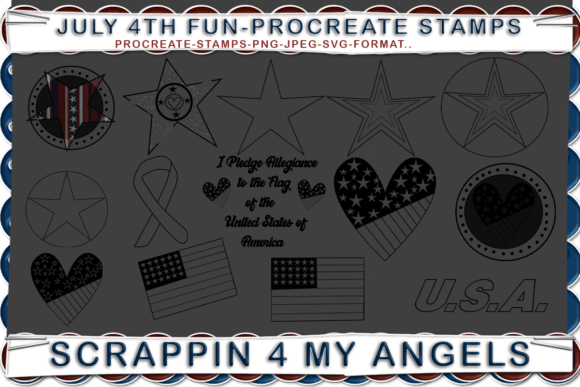
This particular collection stands out because it includes fifteen distinct brushes, offering a versatile range of patriotic motifs. Yet, the value extends beyond the brushes themselves. The inclusion of PNG, SVG, and JPEG formats ensures that your work remains flexible across different platforms and software. Understanding how to utilize these varied file types is crucial for maintaining high-quality output whether you are working on an iPad or exporting for web use.
Avoiding Common Integration Mistakes
One of the most frequent errors beginners make when using stamp brushes is treating them as static stickers rather than dynamic design elements. Many users place a star or flag stamp onto their canvas without adjusting the opacity, blending mode, or color dynamics. This results in artwork that looks flat and disconnected from the background. The mistake here is overlooking the customizable nature of Procreate brushes. These stamps are designed to interact with your existing layers.
To avoid this, always experiment with layer blending modes such as "Multiply" for shadows or "Screen" for glowing effects. For instance, if you are creating a fireworks scene, using a stamp with a soft edge and setting it to "Add" can create a realistic luminous effect that a standard opaque stamp cannot achieve. This small adjustment transforms a generic clip-art look into a professional, integrated illustration.
The Overlooked Power of Vector Formats
Another significant misunderstanding involves the file formats included in the package. Many digital artists focus exclusively on the Procreate brush files and ignore the accompanying PNG, SVG, and JPEG assets. This is a missed opportunity, especially for entrepreneurs and marketers who may need to use these graphics outside of the Procreate ecosystem. The SVG format, in particular, is invaluable for scalability.
If you are designing a logo for a small business’s Independence Day sale or creating large-format print materials, raster images like JPEGs can become pixelated when enlarged. SVGs, being vector-based, remain crisp at any size. By importing the SVG files into design software like Adobe Illustrator or Canva, you ensure that your patriotic graphics maintain their integrity across billboards, business cards, and mobile screens. Ignoring these formats limits the versatility of your purchase and may force you to recreate assets unnecessarily.
Efficiency vs. Creativity Balance
While stamp brushes are designed to save time, relying on them too heavily can stifle creativity. A common pitfall is using the same five stamps repeatedly across multiple projects, leading to a recognizable and repetitive style that clients or followers may find stale. The set includes fifteen brushes, yet many users only explore a fraction of them. This narrow usage fails to capitalize on the full value of the product.
To counter this, challenge yourself to use at least three different stamps in every new composition. Combine them with hand-drawn elements to create a hybrid style. For example, use a stamp for a complex firework burst but draw the trailing smoke manually. This approach maintains the efficiency of the stamp while adding a unique, human touch that distinguishes your work from others using the same toolkit. It demonstrates skill and intentionality, which are key components of building a strong personal brand.
Checking Compatibility and Quality Before Use
Before diving into a major project, it is essential to verify the technical quality of the brushes. Not all stamp sets are created equal, and some may have poorly defined edges or inconsistent spacing. With this lovely set of July 4th Procreate Stamps, the inclusion of multiple formats suggests a higher level of professional preparation, but you should still perform a quick audit. Test each brush on a blank canvas to check for lag, pressure sensitivity response, and edge clarity.
Additionally, ensure that your iPad and Procreate version are up to date. Older versions of the software may not support newer brush engine features, leading to unexpected behavior. Taking ten minutes to test your tools can save hours of frustration later. If a stamp appears jagged, check your canvas resolution. Working on a low-resolution canvas will degrade the quality of even the best-designed stamps. Always start with a high-DPI canvas to ensure crisp outputs, especially if you plan to print your work.
Maximizing Value for Different Users
Different users will extract different values from this set. For educators, these stamps can be used to create engaging holiday-themed worksheets or digital rewards for students. The PNG files are particularly useful here, as they can be easily dragged and dropped into presentation software or learning management systems without background issues. For bloggers and content creators, the JPEGs offer quick, ready-to-use visuals for social media posts, saving time on graphic design during a busy news cycle.
Freelancers and small business owners should focus on the commercial usability of the assets. Ensure you understand the licensing terms associated with the brushes. While most stamp sets allow for commercial use in end products, reselling the brushes themselves is typically prohibited. Using these stamps to create unique marketing materials for clients adds value to your service offering without significantly increasing your workload. It allows you to deliver polished, thematic designs quickly, improving client satisfaction and turnaround times.
Final Thoughts on Strategic Usage
The key to mastering July 4th Procreate Stamps lies in intentional application. Do not let the convenience of pre-made assets compromise the uniqueness of your voice. Use the fifteen brushes as a foundation, not a crutch. Leverage the SVG and PNG files to expand your reach beyond the iPad. By avoiding common pitfalls like poor blending, format ignorance, and repetitive usage, you can elevate your digital art and marketing materials. This approach ensures that your work remains fresh, professional, and efficient, allowing you to celebrate the holiday with creativity and precision.