City Night Procreate Color Palette Guide
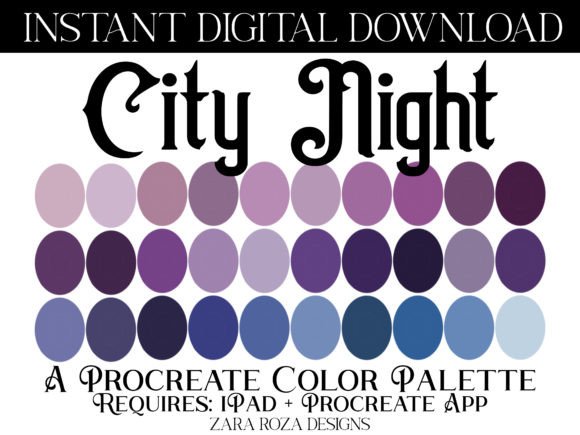
Finding the right mood for your digital artwork often starts with color. Whether you are sketching a quick concept or painting a detailed portrait, the colors you choose set the emotional tone before you even draw a line. The City Night Procreate Color Palette is designed to bridge the gap between dark, moody aesthetics and soft, approachable tones. It offers a curated selection of thirty swatches that blend deep night sky blues with gentle pastels, creating a versatile tool for artists who want their work to feel both mysterious and cozy.
This palette is not just a random collection of shades. It is a thoughtfully assembled resource for anyone using the Procreate app on an iPad. By combining gothic undertones with vintage warmth, it solves a common problem for digital creators: how to make dark themes feel inviting rather than harsh. If you have ever struggled to balance shadow and light in your illustrations, this set provides a ready-made foundation that works harmoniously right out of the box.
Understanding the Aesthetic Appeal
The unique charm of this palette lies in its duality. On one hand, it features rich, deep hues like navy, aubergine, and violet. These colors evoke the feeling of a quiet city at midnight, perfect for creating depth and drama. On the other hand, it includes soft lavenders, muted pinks, and pale iris tones. These lighter shades add a touch of whimsy and nostalgia, reminiscent of 70s, 80s, and 90s retro styles.
This combination makes the City Night Procreate Color Palette ideal for several popular artistic niches. For fans of the "dark academia" or "witchy" aesthetic, the deep purples and blues provide the perfect backdrop for magical scenes, old books, or candlelit interiors. Meanwhile, the pastel accents allow for delicate details, such as floral elements, soft skin tones, or dreamy lighting effects. It captures an elegant, artsy vibe that feels both modern and timeless.
Many digital artists find that working with pre-selected colors saves time and reduces decision fatigue. Instead of scrolling through thousands of options, you have thirty handpicked swatches that are guaranteed to look good together. This cohesion is essential for maintaining a professional look in your portfolio, whether you are creating social media graphics, book covers, or character designs.
Versatile Uses for Digital Creators
While primarily designed for illustration, the applications for this color set extend far beyond simple drawing. Its balanced range of values makes it suitable for various creative disciplines.
- Digital Painting and Illustration: Use the darker tones for backgrounds and shadows, while the lighter pastels can highlight focal points. This is particularly effective for landscape art, where a night sky needs to feel vast yet detailed.
- Lettering and Calligraphy: The contrast between deep navy and soft mauve creates excellent readability for hand-lettered quotes. It adds a sophisticated touch to wedding invitations, posters, or journal headers.
- Character Design: The palette includes natural-looking tones for hair and eyes, as well as subtle shades for makeup, such as lipstick and eyeshadow. This is helpful for artists who want to create characters with a gothic or emo style without making them look overly aggressive.
- Graphic Design and Branding: Small business owners and marketers can use these colors to create cohesive brand identities. The retro-vintage feel appeals to audiences looking for authenticity and charm, making it great for boutique logos or packaging design.
- Lifestyle and Beauty Art: Because the colors mimic natural tones found in flowers and cosmetics, they are excellent for practicing nail art designs, floral arrangements, or food art illustrations.
The versatility comes from the careful saturation levels. None of the colors are overly neon or jarring. Even the brighter pinks and violets are muted enough to sit comfortably next to the darker shades, ensuring your artwork remains visually relaxing and easy on the eyes.
Practical Tips for Beginners and Professionals
If you are new to digital art, starting with a limited palette like this can significantly improve your skills. It forces you to focus on value and composition rather than getting lost in color choices. Try using only three to five swatches from the set for a single piece. This constraint encourages creativity and helps you understand how colors interact.
For more experienced users, consider using the darker shades as base layers and the lighter pastels for glazing effects. Procreate’s blending modes work beautifully with these translucent, airy tones. You can create a glowing effect by layering pale lavender over a deep violet background, mimicking the way streetlights reflect off wet pavement in a city at night.
It is also worth noting that these colors translate well to different mediums. If you plan to print your work, the muted nature of the palette tends to reproduce accurately on paper, avoiding the disappointment of colors looking duller in print than on screen. This makes it a safe choice for artists who sell prints, stickers, or zines.
Technical Requirements and Setup
Before purchasing or downloading, it is important to understand the technical specifics. The City Night Procreate Color Palette is distributed as a single .swatches digital file. This format is exclusive to the Procreate app, which runs on the iPad. It is not compatible with Photoshop, Clip Studio Paint, or other desktop software unless you manually recreate the colors, which defeats the purpose of the quick-import feature.
To use this palette, you must have an iPad capable of running the latest version of Procreate. This includes the iPad Pro, iPad Air, and standard iPad models that support the app. Once you have downloaded the file, importing it is straightforward.
- Save the
.swatchesfile to your iPad’s Files app or Photos. - Open Procreate and create a new canvas.
- Tap the color circle in the top right corner to open the color panel.
- Select the "Palettes" tab at the bottom.
- Tap the plus sign or import button and select the file from your downloads.
Once imported, the thirty swatches will appear in your library, ready to use with any digital brush. This seamless integration allows you to jump straight into creating without technical hurdles.
Why This Palette Stands Out
In a market flooded with generic color sets, this palette distinguishes itself through its specific mood curation. It does not try to be everything to everyone. Instead, it focuses on a niche that blends the eerie with the elegant. It supports artists who want to explore themes of magic, mystery, and nostalgia without sacrificing visual harmony.
Whether you are illustrating a witchy fairytale, designing a cozy book cover, or simply relaxing with some digital sketching, these colors provide a calming influence. They encourage a slower, more mindful approach to art, allowing you to enjoy the process of creation. For anyone looking to add a touch of classy, earthy charm to their digital toolkit, this palette offers a reliable and inspiring solution.