Integrating the Just Peachy Watercolor Splash Pack into Professional Design Workflows
In the fast-paced world of digital design, efficiency often battles with authenticity. Clients and audiences increasingly crave organic, hand-crafted aesthetics that stand out against the rigid uniformity of stock vector libraries. This is where specialized asset collections like the Just Peachy Watercolor Splash Pack become essential tools rather than mere decorative extras. For professionals ranging from brand strategists to freelance illustrators, understanding how to seamlessly integrate these original, hand-painted graphics into a broader creative process can significantly elevate the quality of final deliverables while reducing production time.
The value of this pack lies not just in the visual appeal of the splashes themselves, but in their versatility and technical compatibility. Because every element and arrangement is hand-painted by the creators, the assets carry a unique texture and imperfection that algorithms struggle to replicate. When incorporated correctly, these elements bridge the gap between traditional artistry and modern digital execution, providing a tangible sense of warmth and humanity to projects that might otherwise feel sterile.
Preparation and Asset Organization
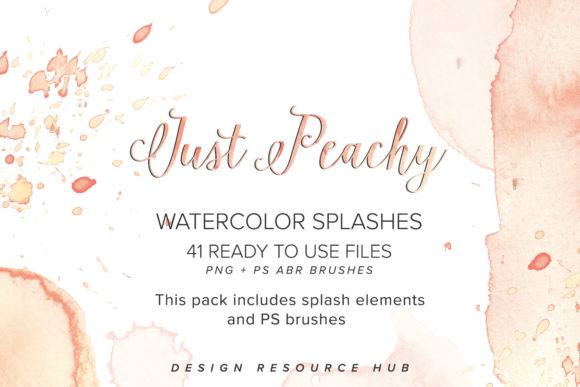
Before diving into a specific project, successful implementation begins with proper file management. The Just Peachy Watercolor Splash Pack includes high-resolution PNG files for the splash graphics and arrangements, along with matching Photoshop brushes in ABR format. Treating these as distinct but complementary resources is key to maintaining an organized workflow.
Start by creating a dedicated library folder within your project directory or digital asset management system. Separate the PNGs from the ABR brush files. The PNGs are ideal for quick drag-and-drop placement in applications like Canva, Adobe InDesign, or Affinity Publisher, where brush functionality may be limited or non-existent. Conversely, the ABR brushes are powerful tools for Adobe Photoshop users who need dynamic control over size, opacity, and flow. By pre-loading these brushes into your software, you eliminate friction during the creative phase, allowing you to focus on composition rather than technical setup.
Strategic Application in Branding and Identity
One of the most impactful use cases for these watercolor elements is in branding design. Modern branding often requires a balance between professionalism and approachability. The soft, fluid nature of the peach-toned splashes provides an excellent backdrop for logos, business cards, and letterheads. However, integrating them requires a strategic approach to ensure legibility and brand consistency.
When designing a logo, use the splash arrangements as secondary elements rather than the primary mark. Place the text over a subtle, low-opacity splash to create depth without compromising readability. For stationery sets, such as invoices or proposal templates, use the smaller individual splashes as corner accents or section dividers. This creates a cohesive visual language that ties various touchpoints together. Because the graphics are hand-painted, they add a layer of exclusivity; clients perceive the brand as bespoke and carefully curated, which can justify premium pricing for services.
Enhancing Wedding and Event Invitations
The wedding and event industry relies heavily on emotional resonance and aesthetic beauty. Here, the Just Peachy Watercolor Splash Pack serves as a foundational layer for invitation suites, save-the-dates, and menu cards. The peach hue is particularly versatile, complementing a wide range of color palettes from blush pinks and golds to deeper terracottas and sage greens.
To implement these graphics effectively, consider the printing process early in the design stage. Since these are digital items, you must ensure that the resolution of the PNG files meets the printer’s requirements, typically 300 DPI at the final print size. Use the larger arrangements as full-bleed backgrounds or central focal points. Layer typography over the lighter areas of the watercolor washes to maintain contrast. If you are using the Photoshop brushes, experiment with blending modes such as "Multiply" or "Overlay" to interact with paper texture overlays, creating a realistic impression that the watercolor was painted directly onto the cardstock.
Streamlining Social Media and Digital Marketing Content
For marketers and content creators, speed is crucial. The Just Peachy Watercolor Splash Pack can drastically reduce the time spent creating engaging social media graphics. Instead of starting from a blank canvas, use the splash arrangements as background templates for Instagram posts, Pinterest pins, or blog headers.
Create a set of master templates in your preferred design software. Place a different splash arrangement in each template, leaving negative space for text and product images. This allows for rapid content creation; you simply swap out the text and photos while keeping the consistent watercolor aesthetic. This consistency helps build brand recognition across platforms. Furthermore, because the elements are transparent PNGs, they can be easily layered over product photography to soften harsh edges or add a artistic flair to e-commerce listings.
Technical Compatibility and Quality Control
Understanding the technical specifications of the assets ensures smooth integration across different platforms. The PNG format supports transparency, which is vital for layering. When using these graphics in web design or digital presentations, ensure that the file sizes are optimized to prevent slow loading times without sacrificing visual quality. Tools like TinyPNG can help compress the images while retaining their crisp edges.
For those using the ABR brushes, remember that brush performance depends on your hardware and software settings. Adjust the spacing and scattering settings in Photoshop to mimic natural paint distribution. Test the brushes on a separate layer before applying them to your main design to gauge the opacity and flow. This step prevents errors and allows for non-destructive editing, giving you the flexibility to adjust the intensity of the watercolor effect later in the process.
Licensing and Commercial Use Considerations
A critical aspect of incorporating third-party assets into professional work is understanding licensing terms. The creators of the Just Peachy Watercolor Splash Pack explicitly state that these graphics can be incorporated into finished products delivered to customers, such as logos or websites. This permission is vital for freelancers and agencies who need to ensure their clients have clear rights to the final designs.
However, it is important to distinguish between using the assets in a finished design and reselling the assets themselves. You cannot redistribute the raw PNG or ABR files as standalone products. Always keep the source files secure and only deliver the flattened or finalized designs to clients. If you have specific questions about usage rights for large-scale commercial projects, contacting the creators directly is the best course of action to avoid any legal ambiguities.
Long-Term Value and Creative Growth
Investing in high-quality, hand-painted assets like the Just Peachy Watercolor Splash Pack offers long-term value beyond immediate project needs. These elements serve as a learning tool for understanding color theory, composition, and texture. By studying how the original artists arranged the splashes and balanced the colors, designers can improve their own eye for detail and aesthetic judgment.
Moreover, having a reliable set of versatile graphics reduces decision fatigue. When you know you have a trusted resource for organic textures, you spend less time searching for suitable assets and more time refining your creative concepts. This efficiency translates to higher productivity and the ability to take on more projects or dedicate more time to strategic planning.
Ultimately, the success of using these watercolor graphics depends on how well they are integrated into your existing workflow. By organizing your files, understanding the technical nuances, and applying the assets strategically across branding, print, and digital media, you can create beautiful, cohesive designs that resonate with your audience. The Just Peachy Watercolor Splash Pack is not just a collection of images; it is a toolkit for enhancing creativity and professionalism in every project you undertake.