Elevating Digital Design Workflows with High-Resolution Pack Overlays
In the rapidly evolving landscape of digital content creation, the demand for unique, high-quality visual assets has never been higher. Whether you are a professional graphic designer, a digital scrapbooker, or an entrepreneur building a brand identity, the tools you use define the quality of your output. One such essential tool gaining significant traction among creators is the strategic use of Pack Overlays. These assets are not merely decorative elements; they are fundamental components that add depth, texture, and professional polish to digital projects. By integrating these overlays into your workflow, you bridge the gap between flat digital compositions and rich, tactile visual experiences.
Understanding the Value of Pack Overlays in Modern Design
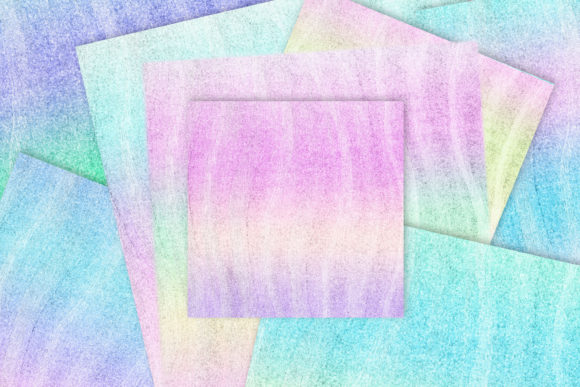
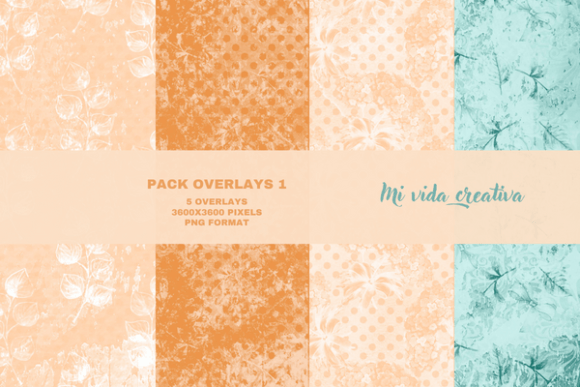
At their core, Pack Overlays are transparent image files, typically in PNG format, that are layered over existing designs to alter their appearance. Unlike standard stock photos, which serve as primary subjects, overlays act as enhancers. They introduce lighting effects, textures, grunge elements, dust, scratches, or artistic patterns that simulate real-world media. The specific pack discussed here offers five distinct overlays created with intricate patterns and brushes in Adobe Photoshop. Each file boasts a substantial resolution of 3600 x 3600 pixels, ensuring that they remain crisp and detailed even when scaled for large-format prints or high-density digital displays.
The relevance of these assets extends beyond simple aesthetics. In an era where audiences are bombarded with polished, algorithmic content, there is a growing consumer preference for authenticity and organic feel. Digital designs that appear too clean or sterile often fail to engage viewers on an emotional level. By utilizing high-resolution overlays, creators can inject a sense of history, warmth, and imperfection into their work. This aligns with broader trends in marketing and branding, where "humanizing" digital touchpoints is key to building trust and connection.
The Shift Towards Hybrid Digital Workflows
The creative industry is witnessing a convergence of traditional art techniques and digital efficiency. This hybrid approach is particularly evident in fields like digital mixed media and art journaling. Artists who once relied solely on physical paints, papers, and inks are now transitioning to digital platforms to leverage the undo button, layer management, and infinite canvas space. However, they miss the tactile unpredictability of physical media. This is where Pack Overlays become indispensable.
These overlays serve as digital proxies for physical textures. When you apply a brush-based pattern overlay to a digital layout, it mimics the stroke of a dry brush or the bleed of watercolor. This allows freelancers and enthusiasts to maintain the soul of traditional art while enjoying the speed and flexibility of digital tools. The 3600 x 3600 pixel dimensions provided in this pack are crucial for this purpose. They offer enough detail to withstand close inspection, ensuring that the texture looks genuine rather than pixelated or artificial. This level of fidelity is what separates amateur designs from professional-grade work.
Enhancing Efficiency Without Compromising Quality
For entrepreneurs and marketers, time is a critical resource. Creating custom textures from scratch in Photoshop can be time-consuming, requiring a deep understanding of blending modes, opacity settings, and brush dynamics. By incorporating pre-made Pack Overlays into their asset library, professionals can significantly streamline their workflow. Instead of spending hours crafting a unique background texture, they can drag and drop a high-quality PNG overlay, adjust the blending mode, and achieve a sophisticated result in seconds.
This efficiency does not come at the cost of uniqueness. Because these overlays are created with specific patterns and brushes, they offer a distinct aesthetic that generic stock libraries often lack. The five overlays included in this pack provide a versatile foundation for various projects. Whether you are designing a social media post, a website banner, or a printable art journal page, these assets adapt seamlessly to your creative vision. The transparency of the PNG format ensures that they integrate smoothly with any color scheme or underlying image, allowing for endless customization possibilities.
Practical Applications Across Creative Disciplines
The versatility of Pack Overlays makes them suitable for a wide array of applications. Understanding how to leverage them can transform your approach to different types of projects.
- Digital Scrapbooking: Enthusiasts can use these overlays to add aged paper textures or light leaks to their digital layouts, creating a nostalgic feel that honors the tradition of physical scrapbooking.
- Art Journaling: Digital artists can layer these patterns over sketches to simulate mixed media effects, adding depth and complexity to their journal entries without the mess of physical supplies.
- Brand Identity Design: Marketers can use subtle texture overlays to give digital brand assets a premium, tactile quality, distinguishing their visuals from competitors who rely on flat design.
- Social Media Content: Influencers and content creators can apply these overlays to photos to create a consistent, curated aesthetic across their feeds, enhancing engagement through visual cohesion.
It is important to note that photo colors in promotional materials are illustrative only. The true value lies in the structural integrity and textural detail of the overlays themselves. Users are encouraged to experiment with different blending modes such as Multiply, Screen, Overlay, and Soft Light to discover how each interaction changes the mood of their project. This experimental process is part of the creative joy, allowing users to make the assets their own.
Technical Considerations for Optimal Results
To get the most out of your Pack Overlays, it is essential to understand the technical aspects of their implementation. The 3600 x 3600 pixel size is chosen to provide a balance between file size and resolution. This dimension is large enough to cover most standard digital canvases and print sizes up to A3 or larger at high DPI. When working in Photoshop or similar software, ensure that your document resolution matches the intended output. For web use, 72 PPI is standard, but for print, 300 PPI is recommended. The high pixel count of these overlays ensures they remain sharp in both scenarios.
Furthermore, the use of PNG format guarantees lossless compression. Unlike JPEGs, which can introduce artifacts and degrade quality upon saving, PNGs preserve the transparency and crisp edges of the brush strokes and patterns. This is vital for maintaining the professional look of your final composition. When saving your final project, consider flattening the image only after you are satisfied with the overlay placement, keeping the original layered file for future edits.
The Future of Digital Texture and Authenticity
As technology advances, the line between digital and physical continues to blur. We are seeing a rise in haptic feedback, augmented reality, and high-fidelity displays that demand higher quality visual assets. In this context, Pack Overlays are not just a trend but a necessary evolution in digital design. They address the human desire for tangible connection in a virtual world. By incorporating elements that mimic the imperfections and richness of physical media, designers can create more engaging and memorable experiences.
Moreover, the accessibility of these tools democratizes high-end design. You no longer need to be a master painter to create textured, complex artworks. With the right resources, such as this set of five high-resolution overlays, anyone with a basic understanding of digital tools can produce professional-level results. This empowerment fuels creativity and innovation across industries, from small business marketing to personal artistic expression.
Integrating Overlays into Your Creative Strategy
To effectively integrate these assets into your workflow, start by building a library of go-to overlays. Categorize them by mood, texture type, or color tone. When starting a new project, browse your library before reaching for generic filters. Ask yourself what emotion or atmosphere you want to convey. Do you need the grittiness of urban decay, the softness of vintage paper, or the energy of abstract brushstrokes? The five overlays in this pack offer a range of possibilities that can serve as the foundation for your visual narrative.
Remember that subtlety is often key. An overlay should enhance, not overpower. Adjust the opacity to find the sweet spot where the texture adds interest without distracting from the main subject. Experiment with masking techniques to apply the overlay only to specific areas of your design, creating focal points and guiding the viewer’s eye. This level of control is what transforms a simple image into a compelling piece of visual communication.
In conclusion, Pack Overlays represent a powerful tool in the modern creator’s arsenal. They offer a practical solution to the challenge of creating authentic, textured digital art efficiently. By understanding their value, technical requirements, and creative potential, you can elevate your projects and stand out in a crowded digital landscape. Whether you are a seasoned professional or an enthusiastic beginner, incorporating these high-resolution assets into your workflow will open new avenues for expression and innovation. Embrace the texture, experiment with the layers, and let your digital creations resonate with the depth and warmth of the physical world.