Streamlining Comic and Graphic Design with the Speech Bubble Procreate Stamp Brush Set
Digital illustration on the iPad has evolved from a niche hobby into a robust professional workflow for designers, marketers, and educators. Within this ecosystem, efficiency is often just as valuable as artistic talent. The Speech Bubble Procreate Stamp Brush Set addresses a specific, recurring pain point for creators who integrate text and dialogue into their visual work: the tedious process of drawing consistent, clean speech bubbles manually. This collection of twenty stamp brushes offers a streamlined alternative, designed specifically for the Procreate environment to accelerate the creation of comics, educational materials, social media graphics, and marketing assets.
Understanding the Tool’s Core Functionality
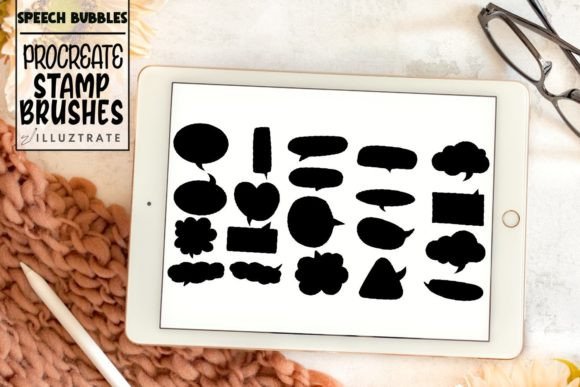
At its essence, this asset pack is not a traditional painting brush but a library of pre-designed shapes that function as stamps. When you tap the canvas with one of these brushes, it places a complete speech bubble shape instantly. The set includes twenty distinct designs, covering a wide range of communicative needs. From standard oval and rectangular bubbles to jagged shouts, thought clouds, and whisper lines, the variety ensures that most common dialogue scenarios are covered without requiring custom vector work in external software.
A critical feature of the Speech Bubble Procreate Stamp Brush Set is its dual-format delivery. Each of the twenty designs comes in two variations: a filled version and a transparent outline version. This distinction is vital for workflow flexibility. The filled versions are ideal for quick mockups or styles where the background color of the bubble is irrelevant or intended to be opaque. The transparent versions, however, allow the underlying artwork or background texture to show through, providing a more integrated and professional look. Users can select their preferred foreground color in Procreate’s palette, and the stamp will apply that color to the outline or fill accordingly, maintaining consistency across a project.
Practical Application in Professional Workflows
For professionals such as graphic designers and marketers, time is a measurable cost. Drawing a perfect ellipse, adding a tail, and ensuring the stroke weight matches the rest of the design can take several minutes per bubble. In a project requiring multiple annotations or dialogue points, this time adds up significantly. By importing these brushes directly into the Procreate brush library, creators reduce this task to a single tap. This efficiency is particularly beneficial for:
- Social Media Managers: Creating engaging Instagram stories or Pinterest pins often requires overlaying text on images. Using standardized, clean speech bubbles helps maintain brand consistency while speeding up production.
- Educators and Instructional Designers: Teachers creating digital worksheets or explainer videos can use these stamps to highlight key information or simulate conversations between characters, making complex topics more approachable.
- Comic Artists and Illustrators: While some purists prefer hand-drawn imperfections, many modern webcomic artists prioritize readability and speed. This set provides a uniform base that can be further customized if needed, ensuring that dialogue remains legible and visually distinct from the artwork.
The usability of the Speech Bubble Procreate Stamp Brush Set extends beyond simple placement. Because these are native Procreate brushes, they respond to the app’s existing transformation tools. After stamping a bubble, users can freely resize, rotate, and distort the shape using the Transform tool to fit specific compositional needs. This flexibility mitigates the primary limitation of stamp brushes: rigidity. If a standard oval does not fit the character’s head position, a quick skew adjustment resolves the issue without redrawing.
Evaluating Quality and Consistency
One of the strongest attributes of this collection is its consistency. When creating a multi-page document or a series of social posts, visual coherence is crucial. Hand-drawn bubbles can vary in line weight, curvature, and tail angle, which may distract the viewer or appear unpolished. These stamp brushes ensure that every instance of a specific bubble type looks identical unless deliberately altered. This reliability is essential for branding and professional presentation.
The design quality of the shapes themselves is clean and modern. The lines are smooth, avoiding the pixelation that can occur with lower-resolution assets. Since Procreate is a raster-based program, the resolution at which you import and use these brushes matters. However, given that they are designed specifically for the iPad’s display capabilities and typical print resolutions for digital products, they perform reliably in most standard use cases. The transparent versions are particularly well-executed, with clean edges that do not leave unwanted artifacts when layered over complex backgrounds.
Limitations and Considerations for Buyers
While the Speech Bubble Procreate Stamp Brush Set is a powerful productivity tool, it is not a substitute for all typographic needs. Users should be aware that these are image-based stamps, not editable text boxes. You cannot type directly into the bubble within Procreate using these brushes. Instead, the workflow involves stamping the bubble shape first, then using Procreate’s Text Tool to add the dialogue separately. This two-step process is standard for raster illustration but may require an adjustment period for those accustomed to vector-based design software like Adobe Illustrator, where text and containers are more dynamically linked.
Additionally, because there are twenty fixed designs, highly specific or unconventional bubble shapes may still require manual drawing. For example, if a project demands a bubble shaped exactly like a specific object or an extremely organic, irregular form, the stamp set serves as a starting point rather than a final solution. However, for ninety percent of standard communication needs, the included variety is sufficient.
Who Benefits Most from This Asset?
This tool is best suited for individuals who value workflow efficiency and visual consistency. It is less relevant for abstract artists who rarely incorporate text or for those who strictly adhere to a hand-crafted, imperfect aesthetic. However, for freelancers managing tight deadlines, small business owners creating their own marketing materials, and educators developing digital content, the return on investment is immediate. The ability to download the file directly to the iPad and import it seamlessly means there is no steep learning curve or complex installation process.
Furthermore, the dual inclusion of filled and transparent options demonstrates an understanding of diverse design contexts. A marketer working on a bold, pop-art style campaign might prefer the filled bubbles for high contrast, while a subtle instructional diagram might benefit from the understated elegance of the transparent outlines. This versatility enhances the long-term value of the purchase, as the brushes remain useful across different types of projects and evolving design trends.
Final Thoughts on Integration and Value
In the broader context of digital creation tools, the Speech Bubble Procreate Stamp Brush Set represents a practical optimization of a routine task. It does not attempt to reinvent the wheel but rather polishes it for smoother operation. By removing the friction of drawing repetitive shapes, it allows creators to focus more on the content of the message and the overall composition of the piece.
For those considering integrating this set into their library, the recommendation is to view it as a foundational asset. It provides a reliable baseline for dialogue and annotation that can be used as-is for quick projects or modified for more bespoke needs. The combination of ease of use, professional finish, and thoughtful variation between filled and transparent styles makes it a worthwhile addition for any serious Procreate user looking to refine their technical workflow. Whether you are illustrating a children’s book, designing a meme for a brand, or annotating a tutorial, these brushes offer a dependable solution that balances speed with aesthetic quality.